Night Rider bike lights are handled through the Customization Shop rather than the Paint, Finish, or Wheels selectors. The documented lighting-related options are Underglow and RGB Lighting. Both are presented as Shop cosmetics and may use Robux, so open the Shop with the motorcycle you want selected and use the current product panel to check the live price, availability, and purchase currency. Do not treat a recorded price or a search result for “Night Rider LED” as a complete current catalog.
Where Night Rider lights fit in Customization
Enter the Garage or workshop, select the motorcycle you intend to modify, and choose Enter Customization Mode. This matters because the selected bike can differ from the bike you last rode, and a preview can be easy to misread if you entered the menu with the wrong vehicle active. Once the customization screen opens, separate the appearance selectors from the Shop offers before spending anything.
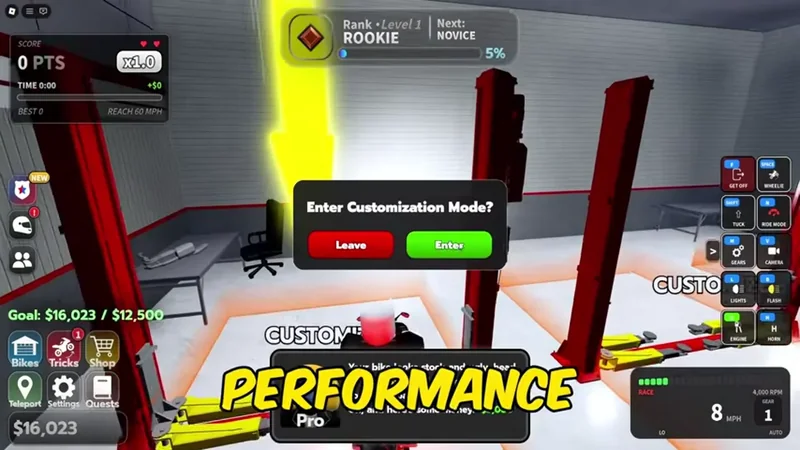
Choose Enter Customization Mode in the Garage to open the interface for viewing vehicle appearance and upgrade options.
The regular appearance selectors cover the visible shape and finish of the motorcycle. Paint changes the paint color, Finish changes the surface treatment, and Wheels changes the wheel appearance. These are useful if your goal is a different look, but they are not documented as bike-light controls. Underglow and RGB Lighting are the entries to inspect when your goal is light beneath or around the motorcycle rather than a paint-surface change.
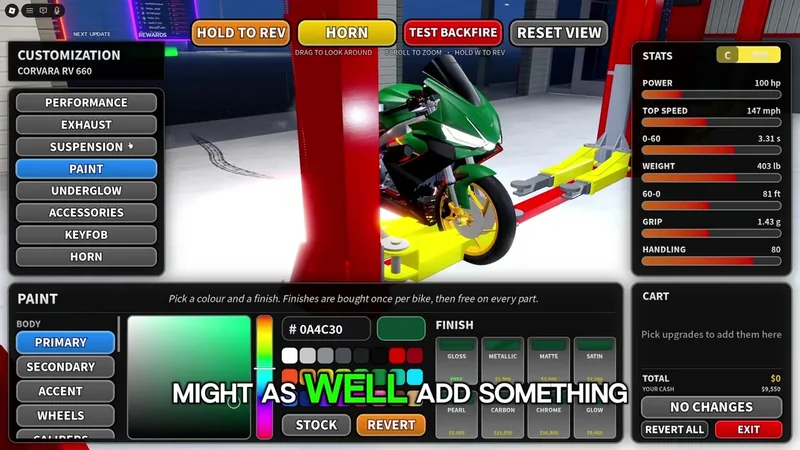
Paint and Finish control the bike's color and surface effect; they are separate from Underglow and RGB Lighting in the Shop.
The Shop can also show Custom Plates. That is another presentation option, not proof that a lighting purchase was applied. If you are building a complete night-riding look, check each selected item separately and read the final purchase panel instead of assuming that a Shop cosmetic includes every visible effect.
Open the Customization Shop for bike lights
This moment shows the Customization route and shop context used to find the Underglow and RGB Lighting offers described here.

Night Rider light options at a glance
Use this table to identify what to look for in the current Shop. A dash means the guide does not establish a reliable value; it is not a claim that the item is unavailable.
| Option | What it changes | Where to check | Currency | Confirmed price |
|---|---|---|---|---|
| Underglow | Adds a motorcycle underbody light effect | Customization Shop | May use Robux | - |
| RGB Lighting | Provides an RGB lighting effect | Customization Shop | May use Robux | - |
| Paint | Changes the bike paint color | Paint selector | Check current panel | - |
| Finish | Changes the paint surface effect | Finish selector | Check current panel | - |
| Wheels | Changes the wheel appearance | Wheels selector | Check current panel | - |
| Custom Plates | Changes the plate presentation | Customization Shop | May use Robux | - |
The table separates lighting from nearby customization terms. “Night Rider LED” is a useful search phrase for finding the lighting area, but it does not identify a separately confirmed item, fixed price, or universal RGB control scheme. Use the label shown in the live Shop rather than buying a similarly named product without checking its preview.
How to check a bike light before buying
- Select the intended motorcycle. Start in the Garage or workshop and confirm that the motorcycle you want to display is selected. An owned bike, a highlighted dealership card, and the motorcycle currently on the road are not necessarily the same state, so check the active vehicle before opening customization.
- Enter Customization Mode. Choose the prompt labeled
Enter Customization Modewhile parked in the work area. If the menu offers Leave and Enter, remain in the customization screen only after confirming the vehicle shown by the preview. - Open the Shop lighting entries. Look for
UnderglowandRGB Lighting. Do not use Paint or Finish as a substitute for a light purchase: those selectors are documented as surface and color choices, while the Shop is where the lighting-related offers appear. - Read the product panel. Check the item name, preview, displayed currency, price, and any availability or discount text. The reviewed guide identifies these Shop offers as potentially Robux-based, but it does not provide a stable price list. The current panel is therefore the only safe place to decide whether the item fits your balance.
- Review the final confirmation. Before accepting, verify that the cart contains the lighting item you meant to select and that the amount is what you expect. A Shop cosmetic and a Cash-funded engine or transmission upgrade use different budget decisions; do not assume that a Cash total from the performance menu also covers an RGB or Underglow purchase.
- Check the bike after the transaction. Return to the Garage view and inspect the selected motorcycle. Confirm that the expected light effect is visible or that the Shop marks the item as owned before leaving the menu. If a preview was shown but the final state is unclear, do not purchase the same item again simply because the first screen did not update immediately.
Lights versus performance upgrades
Bike lights are an appearance decision. Engine and Transmission are the performance categories to inspect when you want a change that may affect the motorcycle’s behavior. The customization guide records Engine and Transmission panels, including upgrade stages and lock states, but it does not establish that Underglow or RGB Lighting changes speed, power, handling, torque, or earning rate.
Keep the two decisions separate when planning a purchase. A performance upgrade is associated with Cash and can show a cart total, while a Shop offer may use Robux. Spending Cash on a motorcycle or an Engine stage can reduce the budget available for other garage work, but that does not tell you how much a Shop light costs. Conversely, seeing a Robux price for an RGB item does not confirm that the bike’s performance panel will change.
If the goal is simply to make the motorcycle easier to recognize at night, inspect Underglow or RGB Lighting first. If the goal is faster acceleration or a different riding feel, leave the Shop and compare the current Engine or Transmission panel instead. The broader customization guide explains those performance categories. This distinction also helps avoid confusing a new paint color or white wheel preview with a lighting upgrade.
Price, availability, and test-stage limits
There is no reliable fixed price to copy into a Night Rider bike-light list from the guide. It identifies Underglow and RGB Lighting and notes Robux pricing in the Shop, but it does not confirm every amount, color choice, RGB control, discount, or unlock condition. A missing value in a guide is not evidence that an item is free or unavailable.
Night Rider is described as being in a test stage. Categories, prices, discounts, and purchase availability can change between builds. Treat an old screenshot, a video description, or a search snippet as a reason to open the Shop, not as a promise about the current release. Check the live item label and cart immediately before confirming.
The same caution applies to the word “LED.” The documented Shop lighting terms are Underglow and RGB Lighting, but they do not establish a separate product called Night Rider LED or a complete LED parts menu. If the current game uses a different label, follow the visible Shop category and its confirmation screen rather than forcing the older term onto the new interface.
If the light is not visible after buying, first check that the same motorcycle is selected, that the item is marked owned or equipped, and that the preview is not limited to the customization screen. If Robux or Cash appears to have been deducted but the item still does not appear, avoid a duplicate purchase. Record the transaction details and use the game’s official support route; a second click cannot prove that the first purchase failed.
First-time Night Rider bike-light questions
Are Night Rider bike lights the same as Paint or Finish?
No. Paint and Finish are appearance selectors for color and surface treatment, while the documented light-related Shop entries are Underglow and RGB Lighting.
Does RGB Lighting have a confirmed fixed price?
No. The guide identifies RGB Lighting as a Shop option that may use Robux, but it does not establish a stable amount. Read the current Shop panel and final cart before confirming.
Is Night Rider LED a separate confirmed item?
No separate Night Rider LED product is confirmed. “Night Rider LED” is a useful search phrase, but the documented product names are Underglow and RGB Lighting; follow the current in-game label.
What should I check if a purchased light is not visible?
Confirm that the intended motorcycle is selected and that the item is owned or equipped, then check whether the effect is visible outside the customization preview. If currency was deducted, do not buy it again before recording the transaction and seeking official support.
SourcesReviewed November 10, 2026
https://www.nightriderroblox.wiki/guides/bikes-and-customization/