Night Rider’s motorcycle system is built around choosing a bike for the job rather than chasing one proven “best” motorcycle. Start with the free Hayate RX-3, compare the Dealership panel for Top Speed, Power, Weight, Handling, price, and Cash multiplier, then move into a higher-priced bike only when its displayed trade-offs fit your riding and budget. The recorded panel for the Kazeno ZT-1000 is a useful high-end example, but it is not a universal ranking: it shows 164 mph, 142 hp, 503 lb, and 1.5x Cash in that record, and current values can change.
Night Rider motorcycles to compare first
The following are the named motorcycles currently documented for comparison. A Dealership card is a comparison point, not proof that the bike is owned; use the Garage to confirm ownership and spawn the vehicle.
| Motorcycle | Role | Recorded price | Displayed stats or use | How to obtain |
|---|---|---|---|---|
| Hayate RX-3 | Starter bike | Free | Basic riding, tasks, and earning | Follow the opening route to the Dealership |
| Corvara RV 660 | Dealership bike | $12,500 | A later purchase used for performance upgrade examples | Buy it from the Dealership when the current panel allows |
| Kazeno ZR-6 | Dealership bike | $50,000 | Higher-priced choice; complete performance panel not confirmed | Buy it from the Dealership |
| Kazeno ZT-1000 | High-performance bike | $150,000 | Recorded panel: 164 mph, 142 hp, 503 lb, 1.5x Cash | Buy it from the Dealership |
| Limited-edition motorcycles | Limited bike category | About $3–4 million in a recorded mention | Rare, expensive appearance and vehicle choices; exact models not identified | Check the current Dealership selection |
Prices and statistics in this table are recorded values, not a promise that every current server shows the same panel. The Hayate RX-3 is the safest starting point because it is shown as free or already available after the opening flow. The Corvara RV 660 and Kazeno ZR-6 represent intermediate spending decisions. The ZT-1000 is the clearest documented high-performance example, but its 1.5x Cash display should be treated as a panel value for that bike and version, not as proof that it is the best choice for every activity.
How to choose a bike in the Dealership
Open a motorcycle card and read the complete panel before buying. Use Top Speed when long, open roads matter; Power when acceleration and response are more important; Weight and Handling when you need predictable steering or are still learning; and the Cash multiplier when the bike’s earning potential matters. These values should be considered together. A higher Top Speed does not by itself prove that a bike is easier to control, better for Police escapes, or more profitable in every activity.
The highlighted Dealership card can be easy to misread. A selected card may only be the vehicle currently being inspected. Look for the OWNED state, then open the Garage and use the spawn control for the motorcycle you actually want to ride. If the bike does not appear beneath you, return to the Garage and check the ownership and spawn state rather than buying again from a preview screen.
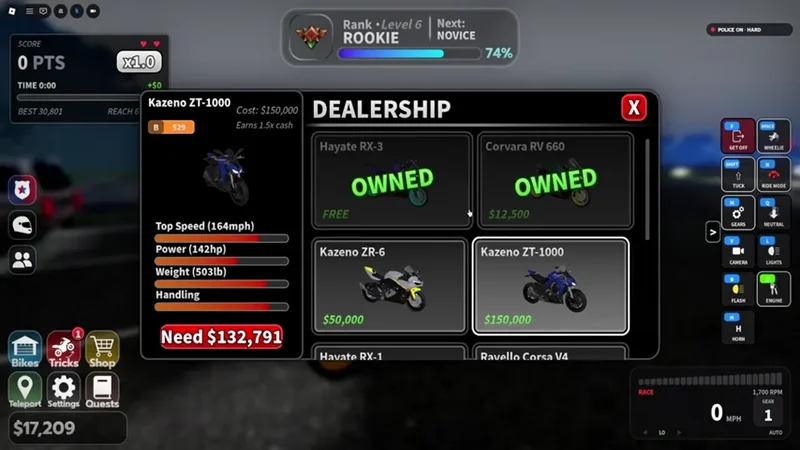
Dealership 卡片可用于核对价格、OWNED 状态和当前显示的车辆性能。
For a practical comparison, make the decision in three passes. First, remove any bike whose current price is outside your Cash budget. Second, compare the displayed performance values that match the activity: Handling and Weight for confidence in turns, Power for getting moving, and Top Speed for open-road travel. Third, check the ownership state and decide whether you are comparing a purchase candidate or a motorcycle you can use immediately. This avoids treating an expensive, high-stat preview as an immediate improvement when the purchase would leave no funds for the activity or the upgrade you actually need.
Cash can be earned through ordinary riding, Near Miss activity, Quests, and Scenic-level activities. If you are short of the listed price, continue with the starter bike and build funds instead of treating the displayed price as a completed purchase. The game’s testing status also means an exact price, stat panel, or vehicle selection should be rechecked in the live Dealership before a major purchase.
Get and spawn the starter motorcycle
This moment supports the starter-bike route by showing the Dealership purchase and the Garage spawn step described here.

Starter bike and first upgrade path
The reliable first path is simple: follow the opening direction to the Dealership, obtain the free Hayate RX-3, open the Garage, and select Spawn. That gives you a known vehicle for learning road control and earning Cash. Once you own more than one motorcycle, use the Garage to switch between them before testing a task, a ride, or a Police chase; do not assume that inspecting a new Dealership card changes the motorcycle already on the road.
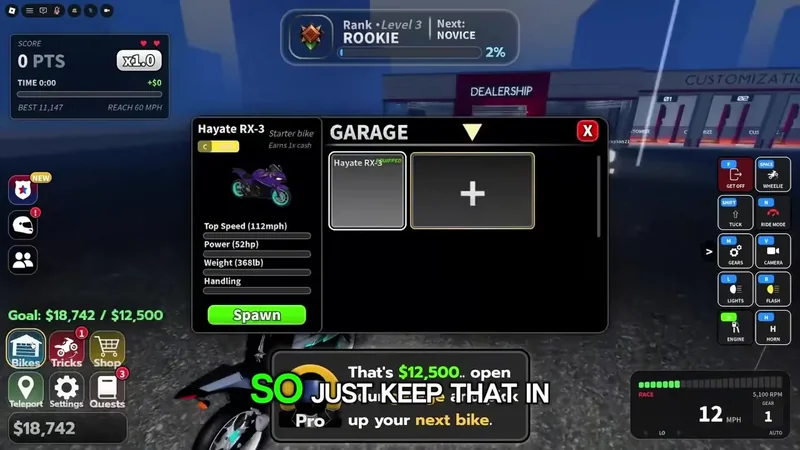
在 Garage 中确认已拥有的 Hayate RX-3,并使用 Spawn 让它成为当前车辆。
The Corvara RV 660 provides the clearest documented upgrade example. In the recorded Customization menu, Engine Stage 1 shows +5% Power and +4% Torque, with a $5,250 Cart total. Those values belong to that recorded Corvara preview. They should not be copied to every motorcycle or interpreted as proof that adding an item to the Cart has already installed and paid for it. Confirm the purchase state after reviewing the Cart.
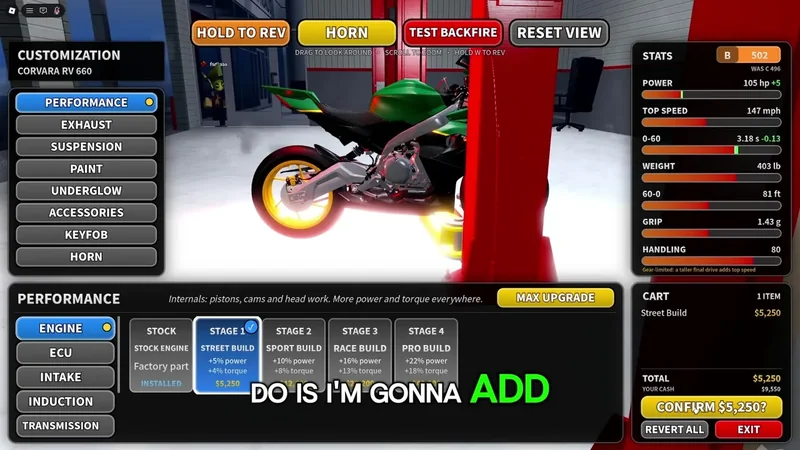
Engine Stage 1 预览显示 Corvara RV 660 的性能增幅和 Cart 总价;加入 Cart 不等于已安装。
The same performance menu shows Stock engine and later Engine Stage 2–4 options. The later stages are visible choices, but their exact prices, effects, and unlock rules are not established here. Transmission also shows Stage 1 Quickshifter, Stage 2 Close-Ratio, and Stage 3 Race Gearbox. Close-Ratio or a higher transmission level is the documented prerequisite direction for Final Drive; Stock or Quickshifter should not be assumed to unlock it directly.
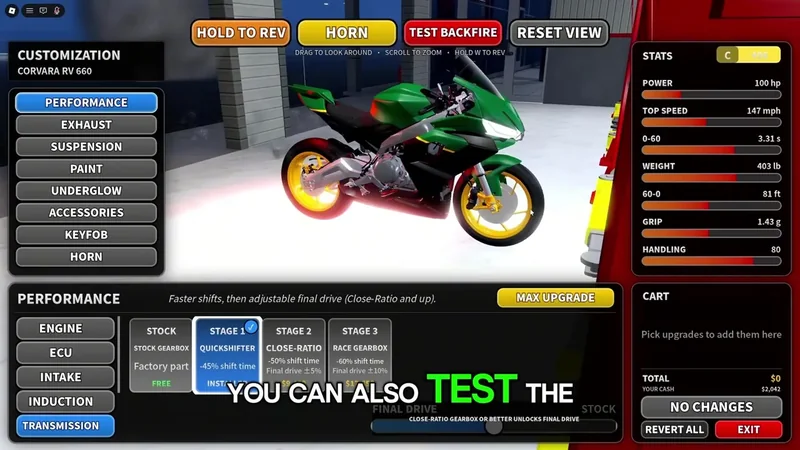
Transmission 菜单列出不同升级阶段;先核对当前选项和解锁方向。
Treat the motorcycle and its modification state as one comparison record. The same named bike can have a Stock engine, an installed Stage 1 engine, or another transmission state, so compare the live upgrade menu before drawing conclusions from another player’s panel. If the menu shows a part but the vehicle still behaves or displays as before, check whether the item was only previewed, placed in the Cart, or actually confirmed. This is especially important for the Corvara example, where the recorded Stage 1 values and Cart total are tied to one preview rather than a universal upgrade chart.
Review motorcycle engine upgrades
This moment supports the performance section by discussing new engines and the engine-upgrade process alongside the documented upgrade-menu limits.
Performance and appearance customization
Enter Customization Mode while the motorcycle is parked, then choose the relevant category. For performance, the recorded menu includes Engine, ECU, Intake, Induction, and Transmission. Select the part, review the shown effect and Cart total, and confirm the purchase. A menu entry proves that an option is available to inspect; it does not prove that it is installed on the selected bike.
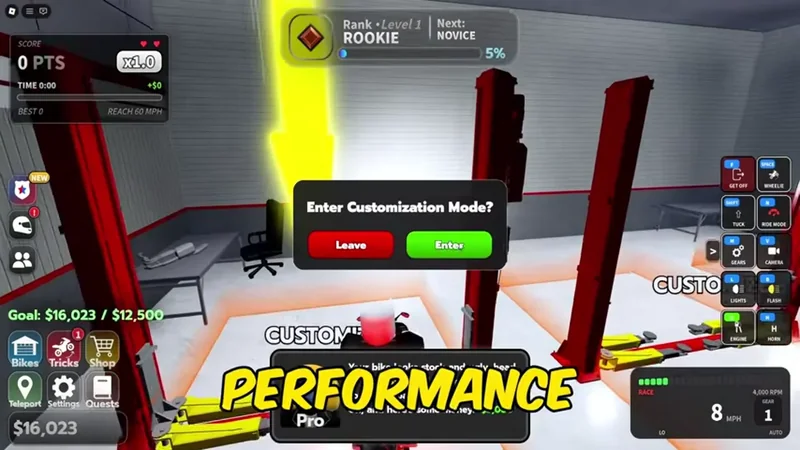
车辆停放后进入 Customization Mode,再选择要查看的性能升级类别。
Paint is a separate appearance path. The recorded interface lets you target Primary, Secondary, Accent, or Wheels, then choose a color and Finish. Wheels in this menu are an appearance target; they do not prove a tire-grip or handling upgrade. Finish options are described as a vehicle purchase that can then be used across parts, but the exact current behavior should be checked in the live menu before spending.
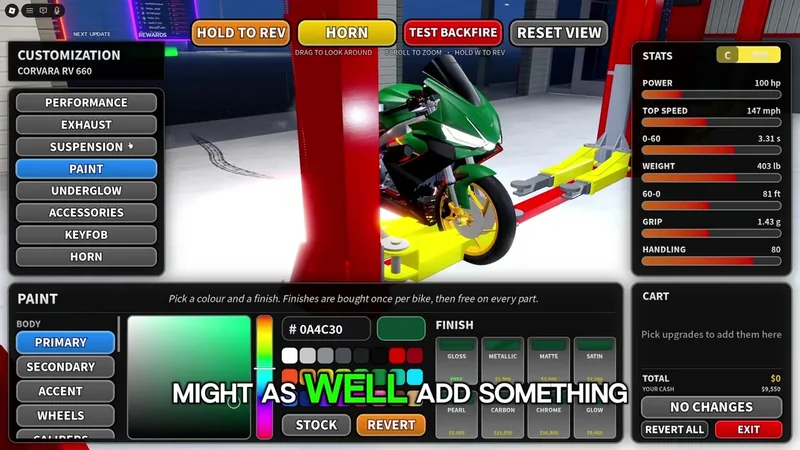
Paint 界面可选择车辆部位、颜色和 Finish;这些选项属于外观自定义。
Underglow, RGB Lighting, and Custom Plates belong to Shop-style cosmetic options rather than the same Cash purchase flow used for a motorcycle. Keep those budgets separate from the Dealership price and from performance upgrades. For the dedicated lighting purchase path, use the bike-light guide. If the Cart shows a cosmetic or performance item but the bike’s panel has not changed, verify that the transaction was confirmed and that the correct motorcycle was selected.
Bikes for riding, earning, and Police escapes
Use the Hayate RX-3 for learning the controls, following the opening objectives, and starting Cash activities. Use a mid-priced purchase such as the Corvara RV 660 when you want a documented platform for testing upgrades. Consider a higher-priced bike such as the Kazeno ZR-6 or ZT-1000 only after checking the current panel and deciding which stat matters to your activity. The available records do not establish an absolute fastest, strongest, or most profitable motorcycle.
Police encounters add a control decision. The recorded guidance indicates that a slower or unfamiliar bike can be harder to manage during a high-Wanted-Stars chase, and one video says a better bike would be needed for a higher-level escape. That supports choosing a motorcycle you can control at the required speed, not simply buying the most expensive card. Test a new bike in ordinary riding first, then compare its acceleration, turning response, and ability to stay on the road before using it as an escape vehicle.
When a purchase or switch appears not to work, check three states in order: the Dealership card for the current price and OWNED marker, the Garage for the owned motorcycle and Spawn control, and the live bike beneath you for the actual vehicle. This separates a preview, a completed purchase, and an active ride. It also avoids spending Cash twice because a highlighted card looked like a confirmed selection.
That same check helps when comparing results after a ride. Record the motorcycle name, the current displayed panel, and whether the vehicle was Stock or modified before judging a change in speed or handling. Keep limited-edition mentions separate from named records because a price range without an identified model cannot tell you which stats, requirements, or appearance options belong to the bike. In a changing test build, a careful comparison of the current card is more useful than an old list that presents every number as permanent.
What the current motorcycle list does not prove
One recorded mention says the game may contain more than 800 bikes, but it does not provide a verifiable full catalog. Do not treat the five records above as the complete Night Rider roster, and do not add unidentified limited-edition names from a price mention. Likewise, visible Engine Stage 2–4 and Race Gearbox entries are not enough to state their exact benefits.
Night Rider is still in testing, so mutable values deserve a live-panel check. Recheck price, Top Speed, Power, Weight, Handling, multiplier, ownership, and upgrade cost when you are ready to spend. The most dependable decision rule is to match the current displayed stats to the activity and your control comfort, beginning with the free Hayate RX-3 and upgrading only when the next bike offers a clear, affordable reason to switch.
Frequently asked questions
Is the Hayate RX-3 free in Night Rider?
The opening sequence shows the Hayate RX-3 being obtained free from the Dealership or already available as the starter bike. Follow the opening route, then check the Garage and use Spawn. If the live server shows a different requirement, use the current in-game prompt.
What is the recorded price of the Kazeno ZT-1000?
The recorded Dealership panel lists $150,000. The same panel shows 164 mph, 142 hp, 503 lb, and 1.5x Cash. Treat these as version-sensitive displayed values and verify the current card before buying.
Does adding an upgrade to the Cart install it?
No. The Cart is a pending purchase state. Review the displayed effect and total, confirm the transaction, and then check the selected motorcycle before assuming the upgrade is installed.
Can I use a Dealership preview to switch motorcycles?
A preview or highlighted card does not prove that the bike is active. Confirm OWNED, open the Garage, select the motorcycle, and use Spawn. The bike that appears beneath you is the one currently active.